SaaS Free Plans in 2026: Which Ones Are Actually Usable
In our catalog of 738 active SaaS tools, 420 (57%) are free, freemium or open source, so a $0 option exists in most categories. Whether it is usable depends on which limit you hit first: seats, records, monthly usage, branding or history. Check that limit against where your team will be in six months, not today.
Mustafa Gezer · · 8 min read
Scope: the figures in this article cover the 738 tools our editors researched and price-checked as of 22 October 2026. The live directory also lists a few maker-submitted products whose prices our editors have not checked yet (5 on this date), so site-wide counts such as the 743 on the Pricing Index are slightly higher.
How common free plans are in 2026
Free plans are the norm rather than the exception. As of 22 October 2026, the 738 active tools in our catalog break down like this by pricing model:
| Pricing model | Tools | Share |
|---|---|---|
| Freemium (permanent free plan plus paid tiers) | 355 | 48% |
| Paid | 318 | 43% |
| Open source | 47 | 6% |
| Free | 18 | 2% |
Counting plans instead of labels gives the same total: 420 tools list a permanent $0 plan on their pricing page (trials excluded). A free trial is something else. About 43% of tools offer one, typically for 14 days, and it ends whether or not you are ready. This post is about plans that stay free.
Where free plans are common, and where they are rare
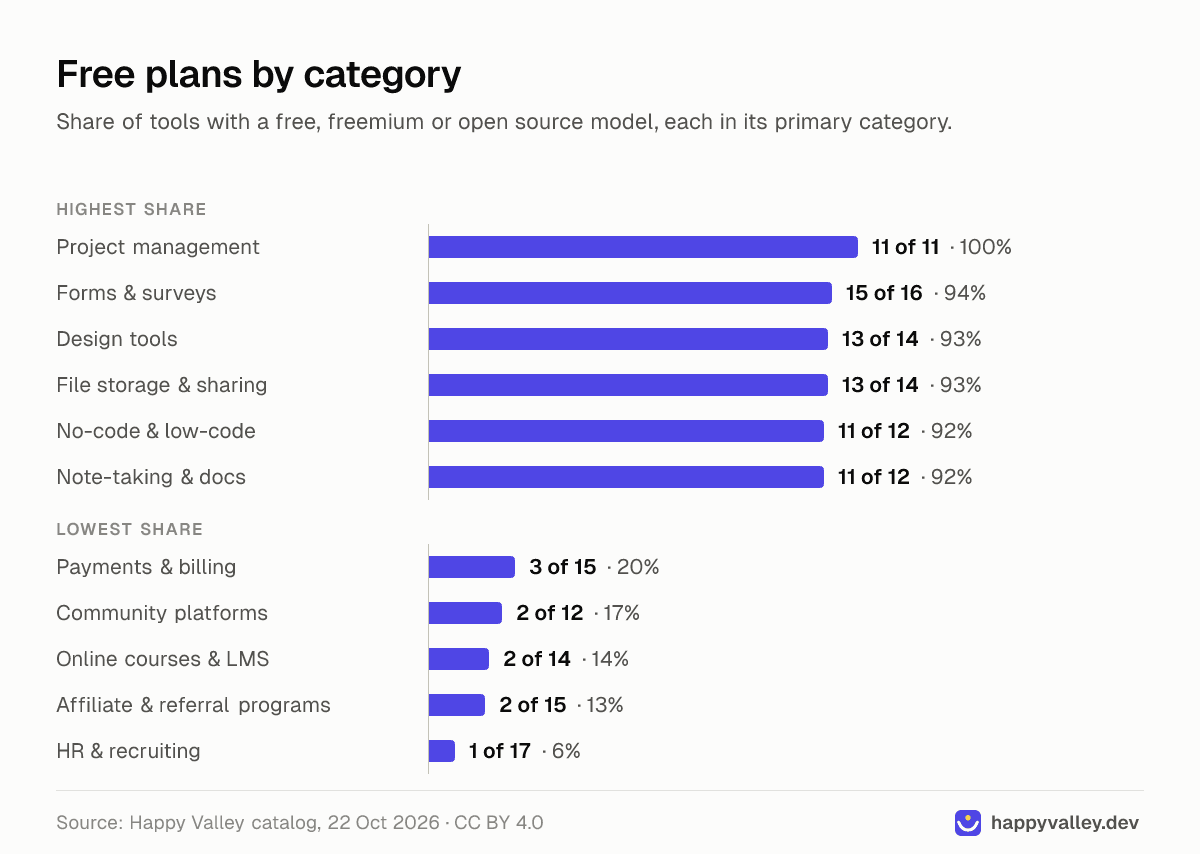
The share of free entry points varies far more by category than by vendor. In some categories nearly every tool has one; in others it is the exception.
| Category | Tools | Free, freemium or open source |
|---|---|---|
| Project management | 11 | 11 (100%) |
| Forms & surveys | 16 | 15 (94%) |
| Design tools | 14 | 13 (93%) |
| File storage & sharing | 14 | 13 (93%) |
| No-code & low-code | 12 | 11 (92%) |
| Note-taking & docs | 12 | 11 (92%) |
| Payments & billing | 15 | 3 (20%) |
| Community platforms | 12 | 2 (17%) |
| Online courses & LMS | 14 | 2 (14%) |
| Affiliate & referral programs | 15 | 2 (13%) |
| HR & recruiting | 17 | 1 (6%) |
The pattern is consistent. Free plans thrive where one person can adopt a tool alone and bring colleagues in later: task boards in project management software, forms and surveys, design files, notes and no-code apps. They are rare where the product handles money, employees or students from day one, and where vendors charge per transaction or per employee instead. If you are shopping in a low-free category such as HR and recruiting, a structured trial and a buying checklist matter more than hunting for a $0 tier.
The limits that define a free plan
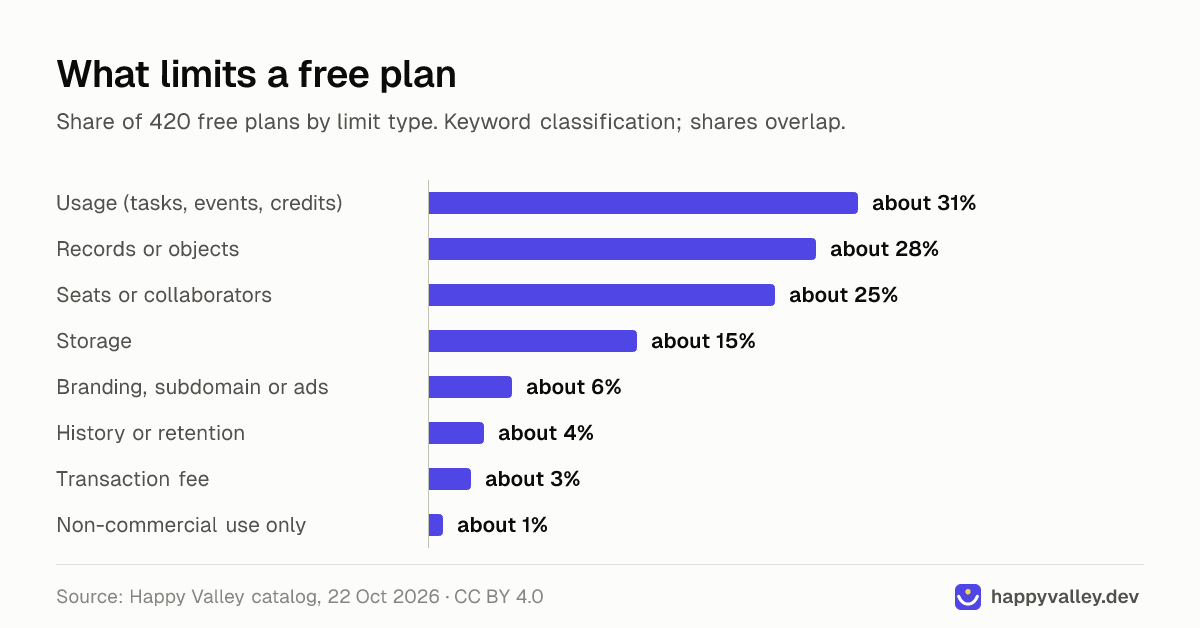
We grouped the free-plan notes of those 420 tools by the kind of limit they mention. The shares are approximate (a keyword count, and many plans have more than one limit). Usage, record and seat caps are close to each other and well ahead of the rest:
| Limit type | Share of free plans (approx.) | Examples from vendor pricing pages |
|---|---|---|
| Usage: tasks, events, emails, credits, minutes | about 31% | Zapier: 100 tasks a month; Otter: 300 minutes per user a month |
| Records or objects: contacts, rows, boards, forms | about 28% | Airtable: 1,000 records per base; Mailchimp: 250 contacts |
| Seats or collaborators | about 25% | HubSpot: 2 users; monday.com: 2 seats |
| Storage | about 15% | Airtable: 1 GB per base; Basecamp: 1 GB |
| Branding, subdomain or ads | about 6% | Tally and Jotform show their branding; Wix uses a subdomain with ads |
| History or data retention | about 4% | Slack: 90-day message history; Notion: 7-day page history |
| Transaction fee instead of a subscription | about 3% | Payhip: 5% per sale; Luma: 5% on paid tickets |
| Non-commercial use only | about 1% | Vercel Hobby (personal, non-commercial use) |
Roughly 1 in 6 free plans also describe their features as basic, core or limited, which usually means automation, permissions, integrations or reporting sit behind the paywall.
Which limit bites first
The headline limit is rarely the one that stops you. The one that matters is whichever grows fastest with your actual use.
- Seats bite first in team tools. HubSpot's free CRM covers 2 users and 1,000 contacts, monday.com's free plan 2 seats and 3 boards, and Asana's Personal plan 2 users. When a third person needs access, the plan is over. Some tools invert this: Linear allows unlimited members but caps the free plan at 250 issues.
- Records bite first in data tools. Airtable allows 1,000 records per base and Mailchimp 250 contacts. A list that grows by a few dozen entries a week outgrows that within months. Attio, by contrast, pairs a 3-seat limit with 50,000 records.
- Usage bites first in automation, analytics and AI. Zapier gives 100 tasks a month on two-step Zaps, and one busy workflow can use that in a week. Event-based analytics is often looser: PostHog includes 1 million events a month.
- Branding bites first on anything customers see. Tally allows unlimited forms and submissions with its branding, while Jotform's free plan has 5 forms, 100 submissions a month and its branding (Jotform vs Tally compares the two). Wix puts free sites on a subdomain with ads. Fine for internal use, weak for a client-facing form or site.
- History bites last, but hardest. Slack keeps 90 days of message history on the free plan, Notion 7 days of page history. Nobody notices until they need an old decision or want to roll back a page.
- Time caps are their own case in video meetings: Zoom Basic ends meetings at 40 minutes, Google Meet group calls at 60.
A five-minute test for any free plan
- Write down your numbers six months from now: people who need to edit, records or contacts, monthly volume (emails, tasks, responses, events).
- Find the free plan's cap for each and mark the one you will reach first. That is the real limit, whatever the plan's headline says.
- Check whether the output is public. If customers see it, branding or a vendor subdomain can rule the plan out on day one.
- Check history and export. How far back does the free plan keep data, and can you export everything in a standard format?
- Read the terms for words like non-commercial, personal or hobby. Vercel's Hobby plan, for example, is for personal, non-commercial use only.
- Price the first paid step for your real team size, not for one user. If the jump is steep, compare the alternatives to Zapier or whichever tool you are evaluating before you build on it.
A free plan that passes this test is usable. One that fails step 2 within three months is a trial without an end date: good for evaluation, risky for anything your work depends on.
When open source is the better free
47 tools in our catalog are listed as open source, and several freemium or paid tools also publish a self-hosted edition. Open source is most common in BI & dashboards (4 of 17 tools), API & developer docs (4 of 15), databases & spreadsheets (3 of 15) and monitoring (3 of 14). Self-hosting removes most of the limits above: no seat cap, no record cap, no vendor branding. Metabase's open-source edition runs with unlimited users, Uptime Kuma is MIT-licensed, and Chatwoot and Twenty offer self-hosted versions next to their cloud plans.
It is not free the way a hosted plan is. You pay for a server and you own updates, backups, security patches and uptime. Self-hosting is the better free when the hosted free plan fails the test above on seats or records, someone on the team already runs servers, and the data should stay on your own infrastructure. It is the worse free when nobody will patch it.
- Good fits: web analytics (Umami and Plausible's Community Edition can both be self-hosted), uptime monitoring, internal dashboards and team chat (Mattermost vs Slack).
- Check the license. Self-hostable does not always mean open source. n8n's self-hosted Community edition is source-available under the Sustainable Use License, which n8n calls fair-code: you may use and modify it for your own internal business or personal use, but not sell it or provide it to others commercially. Some other free self-hosted editions carry similar limits. AGPL tools such as Plausible's Community Edition can be used commercially at no cost; if you modify one, you must offer your modified source code to the people who use it over a network.
- Mind the cloud split. Many open-source products also sell hosting with its own free tier: Umami's hosted Hobby plan covers 100K events a month for one website, and Supabase's free plan 2 active projects with a 500 MB database.
When paying is cheaper than staying free
Staying free has costs too: manual workarounds, lost history and a bigger migration when you finally outgrow the plan. Most first paid steps are modest per person: on monthly billing, Trello Standard is $6 per user a month, Slack Pro $8.75 and Notion Plus $12. The catch is that many of them scale with headcount; about half of the tools with plans we track price per user. Our post on per-seat vs usage pricing explains which model suits which team, and the SaaS Pricing Index has starting prices by category (the catalog median is $20 a month). For the wider picture, see what SaaS costs in 2026.
Bottom line
A free plan is usable when the limit you will reach first is far away. Seats matter for teams, records for data, usage for automation and AI, branding for anything public and history for anything you will need later. When a hosted free plan runs out quickly and you can operate a server, open source is often the better free.
Frequently asked questions
Are free SaaS plans really free forever?
Most freemium plans have no end date, unlike trials, but vendors can and do change limits. Treat "free forever" as a current policy, not a contract, and keep an export of your data.
What is the most common limit on a free plan?
In our catalog, usage caps (tasks, events, emails, credits, minutes) appear in about 3 in 10 free plans, closely followed by record caps (just under 3 in 10) and seat caps (about a quarter).
Is a free trial the same as a free plan?
No. A trial unlocks paid features for a fixed period, typically 14 days in our catalog, and then stops. A free plan has permanent limits but no end date.
Is self-hosted open source software free for business use?
Open source licenses such as MIT and AGPL allow commercial use, but you pay for hosting and maintenance. Check the license first: source-available editions such as n8n's fair-code Community edition allow internal business use but not reselling or offering the software to others commercially.
Which SaaS categories have the fewest free plans?
In our catalog, HR & recruiting (1 of 17 tools), affiliate & referral programs (2 of 15) and online courses & LMS (2 of 14) have the lowest share of free, freemium or open source tools.